Selecting the Domiros PowerPoint Template: A Framework for Professional Presentations
Beyond Generic Slides: The Role of a Structured Template
For professionals, entrepreneurs, and academics, the presentation deck is a critical tool for communication. A common challenge lies in the initial design phase: starting from a blank slide often consumes valuable time that should be spent on refining content and narrative. Presentation templates exist to bridge this gap, offering a pre-built visual framework. The Domiros PowerPoint Template is one such solution, designed specifically for users who need to combine data-driven arguments with compelling visual storytelling. It positions itself not just as a collection of slides, but as a coherent system for building a persuasive visual case.
When comparing presentation assets, key evaluation factors often include depth of content, ease of customization, visual cohesion, and suitability for the presenter's specific industry or tone. Some templates offer minimalistic, text-heavy layouts, while others lean towards bold, image-centric designs. The Domiros PowerPoint Template attempts to occupy a middle ground, emphasizing a balanced integration of text, graphics, and data visualization. This approach distinguishes it from templates that are purely aesthetic or overly schematic.
Core Characteristics and Distinctive Features
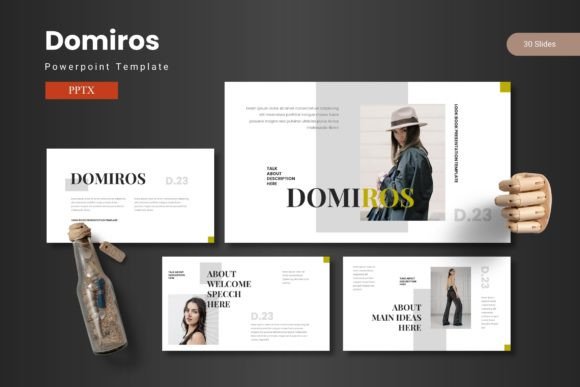
The Domiros PowerPoint Template is built around a set of foundational features that define its utility. The package includes 150 total slides, distributed across 5 distinct premade color schemes. This structure provides 30 slides for each color variation, ensuring a consistent palette throughout a presentation. A significant feature is the inclusion of handcrafted infographics based on master slides. This means that charts, process diagrams, and statistical representations are not isolated images but are integrated into the template's master layout system, allowing for consistent styling and easier global edits.
Other practical elements enhance its usability. The library includes dedicated section break slides to visually segment long presentations, portfolio and gallery slides for showcasing work, and picture placeholders that support a simple drag-and-drop workflow. The claim of "pixel-perfect illustrations" and "all graphic resizable and editable" speaks to a focus on professional-grade visual quality and flexibility. The main file includes 5 PPTX files (one for each color scheme), ensuring users can start with the exact tonal variant they need without manipulating a single monolithic file.
Evaluating the Feature Set Against Common Needs
For a user researching template options, the value of 150 slides versus a smaller set (like 50 or 80) depends heavily on presentation scope. A vast slide library is beneficial for creating lengthy, multi-chapter reports, investor pitches, or comprehensive training modules. However, for a quick 10-minute talk, a smaller, more focused template might be less overwhelming. The Domiros PowerPoint Template's breadth suggests it is geared towards users who prepare varied presentations of different lengths and might appreciate having a single, comprehensive resource.
The five color variations are a notable strength for brand alignment. A user comparing alternatives might find templates with only one or two color options limiting if their content needs to match specific corporate colors or evoke different moods (e.g., a conservative blue for financial data, a vibrant green for an environmental proposal). The Domiros PowerPoint Template allows this switching without redesigning every element. The ease of this change, however, relies on understanding PowerPoint's theme colors, which is a basic but necessary skill.
Strengths and Potential Trade-offs
A primary strength of the Domiros PowerPoint Template is its integrated approach to data visualization. Many standard templates or self-built slides treat infographics as separate entities, leading to inconsistent fonts, colors, and styles. By building infographics on master slides, this template promotes visual unity, which is crucial for maintaining audience trust and attention during data-heavy segments. This makes it a strong candidate for presentations in fields like market analysis, project management, academic research, and consulting, where data credibility is paramount.
Another advantage is the structured organization. With clear sections and a large number of layout options for lists, comparisons, and portfolios, it reduces the time spent on arranging content logically. The user can focus on *what* to say rather than *where* to place it. This is particularly helpful for individuals who are content experts but not graphic designers.
Considerations and Limitations
Every tool involves trade-offs. The richness and specific design style of the Domiros PowerPoint Template might not suit all presentation contexts. Its aesthetic is modern and professional, which may be ideal for corporate and technical settings. However, for a highly creative, artistic, or unconventional topic (like a children's education workshop or an avant-garde design lecture), the template's formal structure could feel restrictive. Users needing extremely whimsical or non-linear visual narratives might find better fit with more niche, theme-specific templates.
The reliance on PowerPoint itself is a fundamental consideration. While the template is offered in PPTX format, ensuring compatibility with modern versions of PowerPoint, its advanced features like master slide-based infographics are deeply tied to that ecosystem. Users who primarily work in other presentation software like Google Slides or Keynote would need to seek alternatives designed for those platforms, as conversion often breaks complex master slide linkages.
Furthermore, the "easy-to-use" promise depends on the user's baseline proficiency with PowerPoint. While drag-and-drop placeholders simplify image insertion, fully customizing the handcrafted infographics or altering the master slide structure requires a more intermediate understanding of the software. A complete novice might still face a learning curve, whereas a user familiar with PowerPoint's basics will unlock its potential more rapidly.
Identifying the Right Fit: When to Choose This Template
The Domiros PowerPoint Template is likely the right choice for several realistic scenarios. Consider a mid-level manager preparing a quarterly business review for senior leadership. The presentation needs to showcase financial metrics (using clean infographics), highlight team achievements (using portfolio slides), and outline future strategies (using section breaks and process diagrams). This template provides a unified, professional shell for all these components, elevating the perceived quality of the work without requiring design expertise.
An academic researcher presenting complex findings at a conference is another good fit. The need to display methodologies, data sets, comparative analyses, and conclusions aligns perfectly with the template's structured layouts and data visualization emphasis. It helps translate dense information into accessible slides, which is crucial for engaging a multidisciplinary audience.
Similarly, a freelancer or small business owner creating a client proposal or service portfolio can benefit. The gallery slides and customizable colors allow them to present their work attractively and align the presentation with their own brand identity, fostering a sense of professionalism and attention to detail.
When Other Options Might Be More Suitable
It is equally important to recognize situations where the Domiros PowerPoint Template may not be the optimal selection. If the core requirement is extreme speed and simplicity for a very basic, internal update meeting—a "stand-up" style presentation with just bullet points and a couple of images—a much simpler, free template or even a well-designed company standard slide might suffice. The extensive options in the Domiros package could be underutilized.
For presentations that are fundamentally interactive or non-linear, such as workshops where slides are merely visual prompts for discussion, a template with a heavier focus on individual, impactful full-screen images and minimal text might be more effective. The structured, multi-element layouts of the Domiros PowerPoint Template are designed for sequential, information-delivery presentations.
Users whose work demands absolute, pixel-level control over every design element, or who need to integrate custom animations beyond standard PowerPoint transitions, might find the template's pre-built framework a constraint. In these cases, building from a near-blank state or using a template that is essentially a collection of minimalist layout guides could offer more creative freedom.
Making an Informed Decision
Choosing a presentation template is a practical decision with implications for both efficiency and impact. The Domiros PowerPoint Template offers a compelling package for users whose presentations are information-rich, require a professional and cohesive aesthetic, and benefit from a wide array of ready-to-use slide types. Its strength lies in marrying data with design systematically.
Evaluating alternatives requires weighing your most common presentation needs. Consider the typical length of your decks, the importance of data visualization versus pure narrative, your personal comfort level with PowerPoint customization, and the tonal requirements of your audience. By mapping these factors against the features and design philosophy of templates like Domiros, you can select a resource that truly augments your ability to share ideas with clarity and confidence.