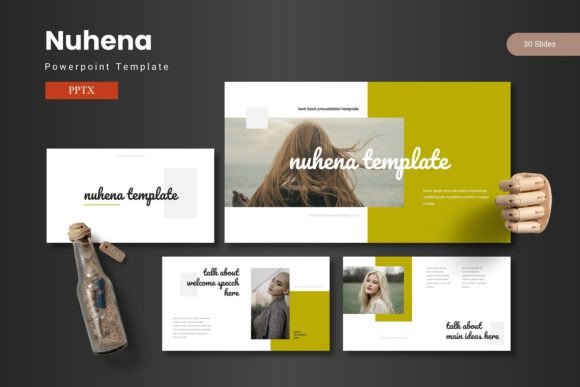
Nuhena PowerPoint Template: Design Presentations with Confidence
Imagine you have critical data to share, a compelling story to tell, or a vision you need your team to embrace. Your presentation is the bridge between your ideas and your audience's understanding. Yet, the process of building that bridge—designing slides that are both authoritative and engaging—can consume hours of your valuable time. This is where a professional PowerPoint template like Nuhena becomes not just a design asset, but a strategic tool. The Nuhena PowerPoint Template is crafted for professionals who need to convey complex information with clarity and visual impact, without becoming expert graphic designers.
Moving Beyond Generic Slides to Purposeful Design
The core value of the Nuhena PowerPoint Template lies in its foundational structure. It provides a complete, coherent design system rather than a collection of random slides. Starting with 150 total slides organized across 5 distinct color schemes, Nuhena offers a ready-made visual language. Each color variation contains 30 slides, meaning you have a consistent palette for a full presentation without manually changing hues for every chart or text box. This systematic approach solves a common problem: maintaining visual consistency throughout a multi-section presentation. When your color theme, fonts, and graphic style remain uniform, your audience can focus on your content’s progression, not distracting design shifts.
For example, a marketing manager preparing a quarterly review can use one color scheme for performance data, another for competitor analysis, and a third for future projections, all while keeping a unified professional feel. The template’s section break slides act as clear visual chapter markers, helping to structure lengthy presentations into digestible parts. This is particularly beneficial for training sessions, academic lectures, or investor pitches where thematic segmentation is key.
The Practical Advantage of Master Slides and Customizable Graphics
Nuhena is built on master slides, a PowerPoint feature that ensures global design changes are applied everywhere. If you decide to adjust the footer layout or change the default title font, you can do it once on the master slide, and the update propagates throughout your presentation. This saves enormous time compared to editing dozens of slides individually. Furthermore, every graphic element within the Nuhena PowerPoint Template—from the handcrafted infographics to the pixel-perfect illustrations—is resizable and editable directly in PowerPoint. You don't need additional software to tweak a diagram’s size or recolor an icon to match your brand.
Consider a small business owner creating a capability deck. They can use the built-in infographics to visually explain their service process, resize the graphics to fit their specific content, and even edit colors to align with their company logo. The inclusion of easy drag-and-drop picture placeholder and dedicated gallery and portfolio slides means inserting and showcasing visual evidence—product photos, team portraits, project snapshots—is a matter of seconds, not minutes.
Who Benefits Most from Using Nuhena?
The versatility of the Nuhena PowerPoint Template makes it suitable for a wide range of users, but it particularly resonates with those who present regularly with data-heavy or concept-driven content.
Educators and Trainers can leverage the structured layouts to create clear, visually-aided lesson plans. The combination of data slides and illustrative graphics helps explain abstract concepts. Entrepreneurs and Startup Founders often need to pitch ideas quickly and persuasively. Nuhena’s professional aesthetic helps build credibility, while the pre-designed layouts allow them to focus on refining their message rather than slide design. Corporate Professionals in finance, consulting, or project management benefit from the template’s ability to elegantly present complex datasets, timelines, and hierarchies through its infographic sets.
Freelancers, bloggers, and content creators who produce webinars or online courses also find value. The provided portfolio and gallery slides are excellent for showcasing past work or case studies. However, it’s worth noting that if your needs are extremely niche—say, requiring highly technical scientific diagramming or industry-specific schematic formats—you may need to supplement Nuhena with specialized assets. The template provides a powerful general foundation, not ultra-specialized content.
Streamlining the Creation Process from Start to Finish
A significant, often overlooked benefit is how a comprehensive template like Nuhena simplifies decision-making. Faced with a blank slide, a presenter must decide on layout, color, font, and graphic style—numerous micro-decisions that add cognitive load. Nuhena presents a curated set of good choices. You begin by selecting one of the five color schemes, which immediately sets the tone. Then, you navigate through the 30 slides per scheme, choosing layouts purpose-built for specific content types: comparison, quote, team introduction, data chart, process flow.
This guided process reduces friction and accelerates creation. You’re not designing from zero; you’re composing from a library of optimized components. The main files included—the 5 PPTX files for each color scheme—mean you work directly in a fully realized environment. The accompanying readme file, font, and photo information ensure you have all resources to use the template correctly, avoiding common issues like missing fonts breaking the design.
Achieving Impactful Communication with Visual Clarity
The ultimate goal of any presentation is to communicate effectively. The Nuhena PowerPoint Template is engineered to support this by harmonizing data, graphics, and text. A “visually stunning slide” isn’t about unnecessary decoration; it’s about using visual hierarchy to guide the viewer’s attention to the most important point. The template’s layouts consider this. Clean title areas, balanced content zones, and strategic use of whitespace make slides easier to read and comprehend from the back of a room or on a screen share.
When you share your ideas with confidence, that confidence is partly derived from trusting your slides are supporting you, not undermining you. A cluttered, poorly aligned slide can distract and cause an audience to doubt the presenter’s professionalism. Nuhena’s design mitigates this risk. By using it, you adopt a level of polished visual communication that aligns with the quality of your ideas. This is especially important in competitive or high-stakes environments like client acquisitions, grant proposals, or public speaking events.
In practical use, creating a presentation with Nuhena becomes more about content curation and less about design troubleshooting. You focus on what to say, and the template provides a clear framework for how to show it. This shift in focus can lead to better-prepared speeches, more rehearsed delivery, and ultimately, presentations that truly resonate with their intended audience. Whether your goal is to inform, persuade, inspire, or review, having a reliable design foundation like the Nuhena PowerPoint Template allows you to allocate your energy where it matters most: your message and your connection with the people listening.