Eclautes PowerPoint Template: A Design Framework for Confident Communication
In the world of presentations, the gap between a memorable message and a forgettable one is often bridged by design. A compelling slide deck does more than relay information; it builds credibility, enhances understanding, and persuades its audience. For many professionals, creators, and business owners, crafting such presentations from scratch is a significant challenge, consuming time and creative energy they'd prefer to dedicate to their core ideas. This is where a structured, professional template becomes a powerful tool. The Eclautes PowerPoint Template is designed specifically to address this need, providing a comprehensive, visually-driven framework that helps users share their ideas with confidence.
Beyond Basic Slides: The Purpose of a Professional Template
A PowerPoint template like Eclautes is not merely a collection of pre-colored slides. Its fundamental purpose is to offer a cohesive design system. This system ensures visual consistency—from font choices to graphic styles—across an entire presentation, which is crucial for maintaining audience focus and professional polish. The Eclautes PowerPoint Template focuses on combining data, graphics, and impactful content into a unified visual story. By starting with a robust design foundation, users can channel their effort into refining their message rather than wrestling with alignment, color matching, or icon selection. It shifts the workflow from design creation to content curation, allowing the presenter's expertise to take center stage.
Core Features and Characteristics
The value of any template lies in its specifics. The Eclautes PowerPoint Template is built around several key features that facilitate both creativity and efficiency.
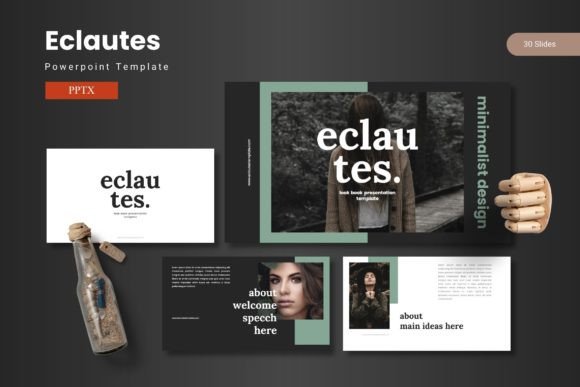
- 150 Total Slides Across 5 Color Schemes: With 30 slides dedicated to each of its 5 premade colors, the template provides immense variety without forcing uniformity. You can maintain a single color theme throughout or leverage the different schemes to visually segment parts of your presentation.
- Handcrafted Infographics Based on Master Slides: This is a critical feature. Infographics—charts, process flows, timelines—are built on master slide layouts. This means customizing them is straightforward; changes to the master automatically update all linked slides, ensuring data visualization remains consistent and editable.
- Resizable and Editable Graphics: Every illustration and graphic element is vector-based or formatted to be pixel-perfect, allowing you to resize, recolor, or adjust components without loss of quality to fit your specific content.
- Practical Layouts for Real Content: The template includes dedicated slides for galleries, portfolios, and team introductions, along with easy drag-and-drop picture placeholder. These are not just aesthetic slides; they are functional frameworks designed for the types of content most presenters actually need to display.
- Structured File Organization: The main download includes the 5 PPTX files (one for each color scheme), a clear readme file, and font and photo information. This organized approach helps users get started correctly and utilize all assets effectively.
Where Can the Eclautes Template Be Applied?
The versatility of the Eclautes PowerPoint Template stems from its balanced design—it is professional enough for corporate settings yet visually engaging for creative pitches. Its applications span numerous scenarios.
For business owners and entrepreneurs, it's ideal for investor pitch decks, annual review presentations, or new product launch proposals. The infographic slides are particularly useful for explaining business models, market growth data, or operational workflows. Marketing professionals and consultants can leverage the gallery and portfolio slides to showcase case studies, campaign results, or service offerings in a client-facing format. The multiple color schemes allow tailoring the deck's mood to the client's brand.
Educators, trainers, and online course creators can use the template to build visually compelling lecture materials or course modules. The clear hierarchy of headings and the mix of text and graphic slides aids in information retention. Even general consumers or individuals preparing a significant personal presentation—such as a wedding plan, community project proposal, or portfolio for graduate school—can benefit from the guided structure. It elevates personal projects to a professional standard without requiring design expertise.
Evaluating Its Suitability for Your Project
When considering a template like Eclautes, it's wise to align its features with your specific needs. Ask yourself a few practical questions: Does your presentation require strong data visualization? The infographic-focused design here is a major advantage. Are you presenting to an audience that values clean, modern aesthetics? The template's emphasis on "visually stunning slides" caters to that. Do you need to produce multiple versions of a presentation for different audiences (e.g., technical vs. executive)? The five distinct color schemes and large slide library allow for quick thematic variations.
A key consideration is the level of customization you desire. The Eclautes PowerPoint Template offers extensive editable features, but it is not a blank canvas. Its strength is providing a high-quality starting point. If your project demands a completely unique, avant-garde visual identity from the ground up, a more basic template or custom design might be better. However, for most users who want to produce a polished, effective presentation efficiently, the constraints of a well-built template are actually liberating—they eliminate countless minor design decisions and accelerate the production process.
Strengths and Practical Expectations
The primary strength of the Eclautes template is its integration of form and function. It doesn't just look good; its layouts are built for real-world content types. The master slide-based infographics ensure that when you need to update a chart at the last minute, you can do so without breaking the design across dozens of slides. The inclusion of section break slides helps organize long presentations logically, improving audience navigation.
Users should approach it with the expectation that they will need to populate it with their own substantive content. The template provides the vessel, but you fill it with your ideas, data, and images. Familiarity with basic PowerPoint functions—like editing text, replacing images in placeholders, and perhaps using the color theme selector—is recommended to get the most from it. The provided readme file and font information are there to smooth this learning curve.
A Real-World Application Scenario
Imagine a startup founder preparing for a crucial funding round. They have complex financial projections, a user growth timeline, a competitive market analysis, and need to introduce their team. Using a blank PowerPoint file, this task is daunting. With the Eclautes PowerPoint Template, the founder selects a color scheme that aligns with their brand (perhaps a bold scheme for impact). They quickly locate:
- A timeline infographic slide to map their company's milestones.
- A financial chart slide to visualize their projections.
- A comparison table slide to detail market analysis.
- A team introduction slide with photo placeholders.
- A portfolio slide to showcase their product prototype images.
Each slide has a designed layout, so the founder simply inserts their specific numbers, text, and photos. The consistent typography and graphic style create a professional, trustworthy aesthetic. The presentation feels cohesive and confident, allowing the founder's compelling business story to resonate without visual distraction. This practical efficiency and elevated outcome underscore the template's value.
Sharing Ideas with Confidence
Ultimately, the goal of any presentation tool is to reduce the friction between having a great idea and communicating it successfully. The Eclautes PowerPoint Template serves as that bridge. By offering customizable layouts, a vast array of purpose-built slides, and easy-to-use features, it empowers users to focus on what matters most: their content and their audience. Whether you are a seasoned professional or someone presenting an important personal project, leveraging a structured design framework can transform the process from a chore into an opportunity to share your ideas with clarity, impact, and confidence.