A Balanced Look at Bunera - Keynote Template for Professional Presentations
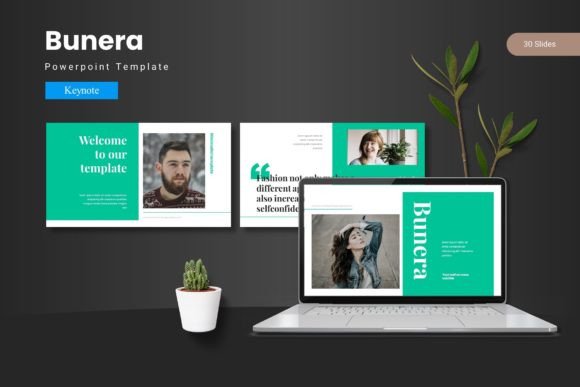
In the crowded market of presentation templates, Bunera - Keynote Template offers a distinct proposition for Apple users. It is not merely a collection of slides, but a structured design system built specifically for Keynote. The core promise is a cohesive and visually engaging experience, facilitated by a set of master slides, layouts, and assets that users can customize to match their specific needs. The goal is to help presenters deliver slides that impress an audience and leave a lasting mark, without starting from a blank canvas.
What makes Bunera stand out is its internal structure and scope. It is built around five premade color schemes, with thirty slides dedicated to each. This provides a substantial 150 total slides as a foundation. The template includes essential components like section break slides, handcrafted infographics, pixel-perfect illustrations, and dedicated slides for galleries and portfolios. Importantly, all graphic elements are resizable and editable, and picture placeholders support a drag-and-drop workflow, aiming to reduce technical friction for the designer.
Key Features and Their Practical Implications
When evaluating a presentation template, the feature list must be translated into real-world utility. Bunera's offering of 150 slides across five color variations is significant. For a professional preparing a multi-part presentation—such as a company launch, a detailed project report, or a portfolio review—having a large, consistent pool of slides can streamline production. The 30 slides per color scheme act as a thematic block, allowing a user to switch the entire tonal palette of a presentation without redesigning every element.
- Master Slide Foundation: This is a critical feature. All professional templates should be built on master slides, and Bunera's adherence to this principle means global changes to fonts, colors, or logos can propagate throughout the deck efficiently. This is a major advantage over simply buying a collection of static, unlinked slide images.
- Handcrafted Infographics and Illustrations: These are often the most time-consuming elements to create. Bunera includes these, which can be a decisive factor for users who lack dedicated graphic design support. The claim of "pixel-perfect" suggests attention to detail suitable for high-resolution displays.
- Resizable and Editable Graphics: Flexibility is key. This feature means the provided icons, charts, and illustrations can be adapted to fit unique content, rather than forcing the content to fit a rigid graphic.
- Gallery and Portfolio Slides: These are targeted layouts for specific use cases. For photographers, artists, architects, or anyone needing to showcase visual work, these pre-structured slides can save considerable layout time compared to generic slide designs.
Evaluating Bunera Against the Wider Landscape of Options
Comparing Bunera - Keynote Template to the broader category of presentation resources involves considering several alternatives. Users are typically evaluating between building slides completely from scratch, using a generic template from Keynote's built-in gallery, purchasing a premium third-party template like Bunera, or utilizing a different presentation tool altogether (such as PowerPoint or web-based apps).
Building from scratch offers total control but demands high design skill and time. Keynote's included templates are free and integrated, but they are often generic and widely recognized, which can undermine a brand's unique identity. Bunera, as a premium third-party option, sits between these poles: it offers a distinctive, professional starting point with more depth and customization than stock templates, but requires a financial investment and assumes the user is committed to the Keynote ecosystem.
A Focus on Cohesion and Customization
The emphasis Bunera places on a "cohesive and visually engaging experience" addresses a common pitfall in presentation design: inconsistency. When slides are cobbled together from different sources or hastily designed, the resulting deck can feel disjointed and undermine the presenter's authority. Bunera's system, with its master slides and coordinated color schemes, is designed to enforce visual harmony. The ability to customize layouts, fonts, and colors "effortlessly" is a relative claim; it will still require user effort, but the structured system should reduce the complexity of that task compared to an unstructured project.
A natural comparison is to other premium Keynote templates. Without naming specific competitors, one can assess Bunera by its feature balance. The inclusion of 150 total slides is on the higher end of what's typically offered, suggesting it is geared for users who produce lengthy or varied presentations. The five color variations are also a notable strength, providing flexibility for different brands, moods, or presentation contexts (a bright scheme for a creative pitch, a dark scheme for a formal report). However, the tradeoff for this breadth is file size and potential complexity; a user seeking a minimalist, 15-slide template for a short talk might find Bunera's extensive library overwhelming.
Identifying the Best Fit and Potential Limitations
Bunera - Keynote Template is likely the right choice for a specific profile of user. It fits well for professionals, entrepreneurs, educators, or creatives who regularly use Apple Keynote, value a strong visual identity, and need to produce polished, multi-section presentations without a dedicated design team. Realistic examples include a startup founder crafting a investor pitch deck, a marketing manager presenting a quarterly campaign review, or a university lecturer designing a visually rich course module.
The template's strengths are most apparent in scenarios requiring brand alignment, visual storytelling, and efficiency. If your presentation must consistently use your company's colors and fonts, Bunera's master slide system is a practical tool. If your content relies heavily on data visualization, the handcrafted infographics can be a valuable starting point. If you need to showcase multiple images or products, the gallery slides directly serve that need.
However, there are situations where Bunera may not be the optimal choice, and recognizing these limitations is part of an informed decision.
- Tool Commitment: It is exclusively for Keynote. If your workflow or organization standardizes on PowerPoint or Google Slides, this template is not compatible.
- Design Overhead: While it aims for effortless customization, any template with 150 slides and deep customization options requires a learning curve. Users with very basic Keynote skills or those who need a presentation in under an hour might find simpler, more guided templates more suitable.
- Style Specificity: The included design—through its illustrations and infographics—has a particular aesthetic. If your brand or personal style requires a radically different look (e.g., ultra-minimalist, hand-drawn, or retro), you may still spend significant time overriding Bunera's default art.
- Cost Consideration: As a premium product, it involves a purchase. For users with access to corporate design resources or who find Keynote's free templates sufficient, the investment may not provide proportional value.
Decision Factors for the Informed User
When choosing a presentation template, several concrete factors should guide your evaluation. For Bunera - Keynote Template, consider the following:
- Presentation Frequency and Length: Do you create long, complex presentations regularly? Bunera's volume of slides is an asset for frequent, lengthy use. For occasional, short talks, its value may be diluted.
- Brand and Visual Consistency Needs: How important is a unique, professional, and unified look for your presentations? High importance aligns with Bunera's design system approach.
- Keynote Proficiency: Are you comfortable with Keynote's master slide features and graphic editing tools? Some proficiency is needed to fully leverage Bunera's customizable elements.
- Content Type: Does your work heavily feature data (infographics), portfolios (galleries), or multi-part structures (section breaks)? Bunera's targeted slides for these areas can be a significant efficiency gain.
- Budget and Resource Tradeoffs: Does purchasing this template represent a more efficient use of funds and time compared to hiring a designer for each project or spending your own hours designing from zero?
Conclusion: A Tool for Specific Scenarios
Bunera - Keynote Template is a comprehensive design system for Apple Keynote, best understood as a productivity and quality tool for a particular user segment. Its distinct value lies in the combination of scale (150 slides), structured customization (master slides, five color schemes), and targeted assets (infographics, gallery slides). It compares favorably to generic templates by offering more depth and distinctiveness, and to a from-scratch approach by offering immense time savings, provided the user's style aligns with its foundational design.
Ultimately, the decision hinges on fit. For the adult professional aged 20–50 who is committed to Keynote, produces substantial presentations, and prioritizes a polished, cohesive visual output without deep design expertise, Bunera presents a compelling alternative to other methods. In cases where tool compatibility, extreme minimalism, or a very low budget are paramount, exploring other options—whether simpler Keynote templates, different software, or basic in-house design—would be a prudent next step. The most informed choice comes from honestly assessing your specific needs against the practical tradeoffs any template system introduces.