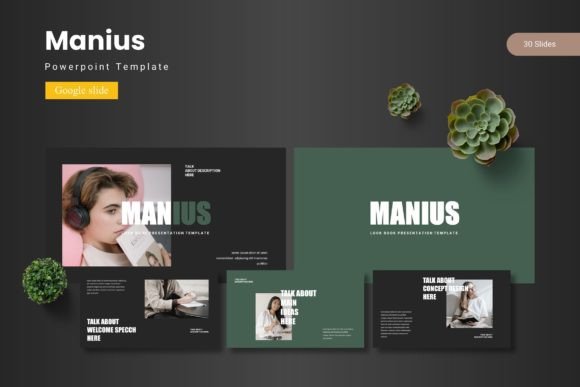
Unlocking Professional Presentations with Manius - Google Slide Template
In today's fast-paced professional environment, creating a presentation that is both visually compelling and effectively communicates your ideas is a common challenge. Whether you're pitching to clients, reporting to stakeholders, or educating an audience, the pressure to deliver a polished, engaging slide deck can be significant. Crafting such presentations from scratch often consumes valuable time and requires design skills you may not possess. This is where professionally designed templates become a crucial solution. The Manius - Google Slide Template is specifically engineered to address this need, providing a comprehensive foundation for anyone looking to elevate their presentations efficiently.
The Core Challenge: Time, Consistency, and Impact
The primary hurdles in presentation creation are typically threefold. First is the time investment needed to design each slide layout, choose cohesive colors, and source quality graphics. Second is maintaining visual consistency across the entire deck, ensuring a professional look that builds credibility. Third, and most important, is achieving the desired communicative impact. A disjointed or bland presentation can undermine even the strongest message. Many professionals find themselves sacrificing one of these elements, often settling for a basic template or an inconsistent mix of slides that fails to fully support their content.
How Manius - Google Slide Template Provides a Solution
The Manius - Google Slide Template is not merely a set of slides; it is a structured design system for Google Slides. It offers 150 total slides organized across five distinct premade color schemes, giving you 30 slides per theme to work with immediately. This volume and variety mean you can start with a complete visual language that suits your topic or brand tone—from bold and energetic to calm and professional—without any initial design work. The template includes essential section break slides to organize your narrative, a suite of handcrafted infographics based on master slides for clear data visualization, and a collection of pixel-perfect illustrations. Every graphic element is resizable and editable, allowing you to adapt them perfectly to your content.
Adaptability at the Core
A key strength of the Manius - Google Slide Template is its built-in flexibility. It understands that your needs are unique. With features like picture placeholders designed for drag-and-drop ease, dedicated gallery and portfolio slides, and five fully realized color variations included in the main file, the template empowers you to modify it deeply to suit your preferences. You aren't locked into a single look. This adaptability ensures the template serves your ideas, rather than forcing your ideas to conform to a rigid design.
Practical Applications and Outcomes
Using the Manius - Google Slide Template translates into concrete outcomes for different professional scenarios. For a startup founder preparing an investor pitch, the infographics and clean layouts can transform complex financial projections into clear, convincing visuals, saving days of design time and increasing confidence during delivery. A marketing manager creating a quarterly review can utilize the portfolio slides and consistent color schemes to present campaign results in a branded, cohesive manner that reinforces team credibility. An educator or trainer can leverage the structured sections and editable illustrations to build a course presentation that is engaging and easy to follow, enhancing knowledge retention for students.
The outcome is consistently a higher-quality presentation produced in significantly less time. You move from spending hours on layout and design to focusing on refining your message and content. The professional baseline provided by the Manius template ensures your visual communication supports and enhances your spoken communication, leading to more effective meetings, clearer understanding, and ultimately, better results.
Tailoring Your Approach
Different users will approach the Manius - Google Slide Template with different strategies based on their proficiency and needs.
For the non-designer or time-pressed professional, the most practical approach is to select one of the five color schemes that best fits the occasion, then utilize the pre-built slides almost as-is. By simply replacing the placeholder text with your content and dragging your images into the designated areas, you can assemble a stunning deck in under an hour. The readme file included with the template provides clear guidance on fonts and photo information to maintain quality.
For the more advanced user or someone with specific brand guidelines, the template serves as a powerful starting canvas. You can edit the master slides to tweak the core layouts, recolor the editable illustrations to match your palette, and mix elements from different color schemes to create a custom hybrid look. The fact that all graphics are resizable and editable makes this deep customization straightforward within Google Slides.
Recommendations for Effective Implementation
To get the maximum benefit from the Manius - Google Slide Template, consider a few useful steps. First, review all five color variations before starting. Choose the scheme that not only appeals to you but also aligns with the emotional tone of your presentation—cool blues for analytical reports, warm tones for creative pitches. Second, plan your presentation structure using the section break slides. They are invaluable for creating a clear narrative flow that guides your audience. Third, make use of the handcrafted infographics for any data, processes, or hierarchies. A visual chart is almost always more effective than a paragraph of text explaining the same concept.
Remember that the included PPTX files offer compatibility and the 30 slides per template give you ample room to cover any topic without repetition. Don't feel you need to use every slide; curate the ones that best serve your specific message. The template is a toolkit, not a prescription.
A Focus on Useful Content Creation
Ultimately, the Manius - Google Slide Template shifts your focus from design obstacles to content creation. It removes the technical barriers that often hinder professionals from delivering their best work. By providing a robust, adaptable, and visually coherent framework, it allows you to concentrate on what matters most: crafting a compelling message, organizing clear arguments, and delivering a presentation that achieves your goals. Whether your situation requires speed, polish, or deep customization, this template is designed to be a helpful, solution-focused resource that improves both the process and the final product of your presentation design.