Pixel Perfect Icon Sets for Language Learning Apps
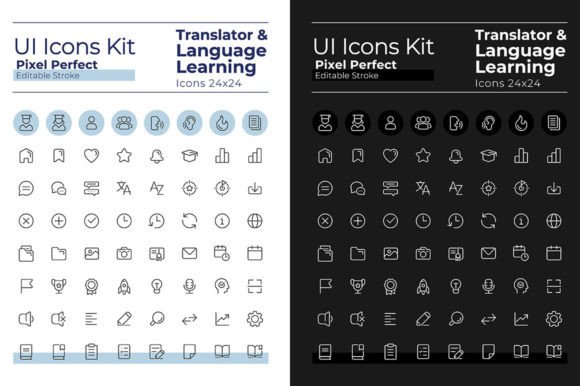
When you're building a digital project, especially one focused on education or communication, visual clarity is paramount. The Translator Pixel Perfect Linear Ui Icons set is a dedicated collection crafted to enhance projects related to language learning and multilingual interfaces. It provides a clean, modern toolkit of symbols that users instantly recognize, helping to guide them through an app or website without confusion.
What Makes This Icon Set Stand Out
Unlike generic icon packs, this set is designed with a specific purpose in mind. Each icon is created as a "linear" outline, meaning they use simple, unbroken lines to form the shape. This linear style achieves a minimalist look that feels both contemporary and highly legible. The "pixel perfect" promise ensures that these icons are mathematically aligned, so they appear sharp and crisp on any screen resolution, avoiding blurry edges or misaligned strokes.
A primary feature is the inclusion of two complete themes: dark mode and light mode. You receive 64 icons tailored for dark backgrounds and 64 for light backgrounds. This isn't just a simple color inversion; the icons are optically adjusted for each environment to maintain maximum contrast and readability. For a language learning app, this means your interface can seamlessly adapt to user preference or system settings, whether they're studying in a bright room or at night.
Flexibility in Design and Application
Every icon comes with an editable stroke. This is a significant advantage for designers. It means you can easily adjust the line weight of any icon directly within vector editing software like Adobe Illustrator to match your project's specific aesthetic. Need a thicker, more bold icon for a headline? Or a thinner, delicate one for a subtle hint? The editable stroke gives you that control without degrading the quality.
The set leverages the Montserrat font family, using both its Bold and Light variants. This creates a cohesive visual language when the icons are paired with text. Montserrat's clean, geometric shapes complement the linear icons perfectly, establishing a unified and professional typographic hierarchy in your menus, buttons, and labels.
Practical Uses for Creators and Educators
Where can you use these icons? The applications are broad. A language learning mobile app is the most direct fit. Imagine using a clear "speech bubble" icon for conversation exercises, a "book" icon for vocabulary lists, or a "headphone" icon for listening comprehension sections. For a blogger or educator creating online tutorials, these icons can visually break down complex language concepts into infographics or cheat sheets.
Small business owners operating in international markets might integrate these icons into their e-commerce site to denote multilingual customer support or translation services. Freelancers building client portfolios or digital resumes could use the icons to highlight language skills in a visually engaging way. The included file formats—EPS, SVG, PNG, JPEG, and AI—ensure compatibility across different platforms, from web development (using SVG) to printed marketing materials (using EPS).
Addressing Real User Needs and Goals
This set solves a common problem: visual inconsistency. Often, designers piece together icons from various sources, resulting in a patchwork look that feels unprofessional. Having a complete, thematically consistent set dedicated to language topics streamlines the design process and elevates the final product's polish. It supports the goal of creating an intuitive user experience. In language learning, where users can already feel overwhelmed, clear visual cues reduce cognitive load and help them navigate the material more efficiently.
For the hobbyist or casual user creating a personal language journal or study aid, the PNG and JPEG formats provide ready-to-use images that can be dropped into simple document or presentation software without needing advanced design skills.
Important Considerations Before Using
While the set is highly versatile, it's important to assess your project's scope. Do you need both dark and light modes? If your project only uses one theme, you still benefit from a large selection within it. Also, consider the technical requirements. If you plan on deeply customizing the icons—changing colors, merging shapes, or altering strokes—you'll want to use the vector formats (AI, EPS, SVG). For quick, fixed-use implementations, the raster formats (PNG, JPEG) are sufficient.
The use of a free font like Montserrat is a benefit, as it reduces licensing concerns, but always verify the specific license terms for the font in your commercial projects. Finally, remember that icons are a supportive element. Their effectiveness depends on being placed within a well-thought-out layout and user interface. They should complement clear text labels and logical information architecture.
Beyond Icons: A Studio for Ongoing Creativity
The Translator Pixel Perfect Linear Ui Icons are part of a broader creative output from BSD Studio. The studio also produces brochure infographic templates, mobile app screen pages, and more, with new topics and discounts released weekly. For creators who regularly need fresh design assets, subscribing to BSD Studio can be a way to stay updated and inspired, ensuring your toolkit evolves alongside your projects.
In essence, this icon set is more than just graphics; it's a designed solution for communication. By providing pixel-perfect clarity, dual-theme adaptability, and editing flexibility specifically for language-related contexts, it empowers a wide range of users—from professional developers to enthusiastic bloggers—to build more effective and visually coherent digital experiences.