Omunov: Your Google Slides Design Toolkit
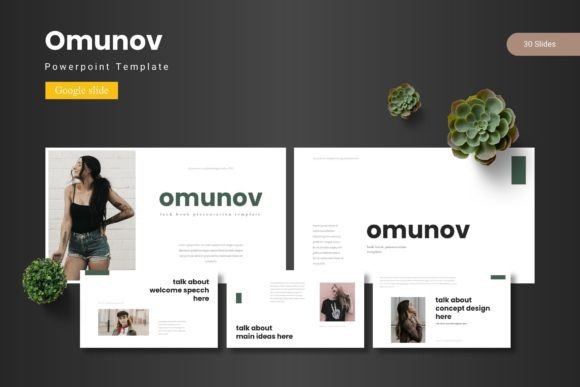
Creating a presentation that looks polished, professional, and truly engaging can be a daunting task. It often requires hours of design work, searching for the right graphics, and ensuring everything is consistent. The Omunov Google Slide Template directly addresses this challenge. It is a comprehensive, professionally designed set of slides built specifically for Google Slides, offering a powerful starting point for anyone who needs to communicate ideas visually.
In simple terms, Omunov is a ready-made design framework. Instead of building every slide from a blank canvas, you begin with a library of 150 slides organized into five distinct color schemes. Each scheme contains 30 slides, providing a cohesive look from start to finish. The core purpose is to save you significant time and effort while elevating the visual quality of your work. Its value lies in merging professional aesthetics with user-friendly flexibility—you get a beautiful, structured foundation that you can then modify to perfectly suit your specific message and brand.
The Appeal of a Structured Design System
Why might someone choose a template like Omunov over designing everything themselves? The answer often revolves around efficiency, consistency, and confidence. Many users, from entrepreneurs pitching to investors to educators preparing course materials, possess great content but lack advanced design skills or the time to develop them. Starting from scratch can lead to disjointed slides, inconsistent fonts, and awkward layouts that distract from the message.
The Omunov template solves these problems by providing a complete system. Its "handcrafted infographics" and "pixel-perfect illustrations" are not just decorative elements; they are visual tools designed to explain data, processes, or concepts clearly. Because all graphics are resizable and editable, you aren't locked into a static look. You can adapt charts, icons, and diagrams to fit your specific data or narrative. The inclusion of dedicated gallery and portfolio slides, along with drag-and-drop picture placeholders, makes integrating your own photos and visuals a seamless process.
Practical Uses Across Different Fields
The versatility of the Omunov Google Slide Template makes it relevant for a wide range of applications. Consider a freelancer needing to present a project proposal to a client. Using Omunov, they can quickly assemble a presentation that feels corporate-ready, using the clean layouts and professional color schemes to build credibility. The section break slides help organize the proposal into clear parts: project overview, timeline, cost breakdown.
For a marketer or small business owner, the template can be the backbone for a product launch presentation or an annual review. The pre-designed infographics are ideal for showcasing market research findings, growth metrics, or new feature benefits without requiring complex software. An educator could use it to build a dynamic lecture series, where the consistent design across multiple lessons aids student comprehension and attention.
Even for casual users or hobbyists creating a personal portfolio or a community club presentation, Omunov removes the intimidation of design. You start with something visually appealing and focus your energy on curating your content—your text, your images, your story—into the provided frameworks.
Key Features That Enhance Flexibility
Beyond the sheer number of slides, several features of the Omunov template contribute to its practical utility. The provision of 5 PPTX files alongside the Google Slides formats is a thoughtful inclusion. It allows users who also work in PowerPoint to maintain the same design integrity across different platforms, offering greater workflow flexibility.
The fact that the design is based on master slides is a crucial technical benefit. In presentation software, master slides control the fundamental layout, fonts, and colors for all slides that follow them. This means when you want to change a font globally or adjust a background color, you can do it once in the master, and it updates across many slides automatically. This ensures deep consistency and makes broad customization efficient.
Having five premade color variations means you can choose a mood that fits your topic—perhaps a bold and vibrant scheme for a creative pitch, or a muted, professional palette for a financial report. You aren't forced to learn color theory to make this choice; you simply pick from the curated options.
Important Considerations Before Using
While the Omunov Google Slide Template is designed for ease of use, it's helpful to approach it with a clear plan. First, review the included "Readme" file. This document typically contains essential information about fonts used and photo resources, ensuring you can maintain the design's look if you add your own elements. You may need to install specific fonts to match the template's typography perfectly.
Second, think about your content structure before diving in. Browse through the 30 slides in your chosen color scheme to understand the available layouts: title slides, text-focused slides, comparison slides, quote slides, and image-heavy galleries. Sketching a rough outline of your presentation’s flow will help you select and sequence the pre-designed slides effectively, rather than just using them in random order.
Finally, embrace the editable nature of the system. The template is a toolkit, not a rigid document. Feel confident in resizing elements, replacing placeholder text with your own, and even mixing infographics from different slides to create a custom layout. The goal is not to use every slide, but to use the right slides to support your unique message.
Streamlining Your Creative and Professional Process
Ultimately, the Omunov Google Slide Template represents a modern solution to a common need: the need to create high-quality visual presentations efficiently. It supports goals ranging from saving time, improving design consistency, and enhancing professional image to simply reducing the stress associated with public speaking or important deliveries. By providing a rich, editable design foundation, it empowers users to focus on what matters most—crafting and delivering compelling content.
Whether you are a beginner apprehensive about design tools, a professional under tight deadlines, or a creator wanting a polished aesthetic, this template adapts to your context. Its integration with the familiar Google Slides platform, combined with the depth of its slide library and design features, makes it a practical asset for turning ideas into impactful visual stories.