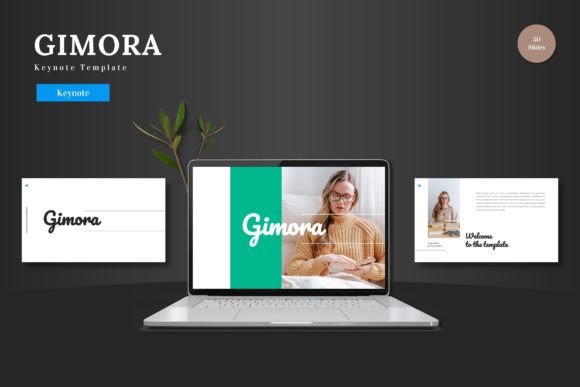
Gimora Keynote Template: Your Versatile Presentation Foundation
When you need to present an idea, whether to a potential investor, a classroom of students, or your own team, the foundation you build upon matters. A presentation template isn't just about aesthetics; it’s about structure, clarity, and the efficient communication of your message. Gimora - Keynote Template offers a clean, scalable, and multipurpose starting point designed to reduce friction in the creation process and elevate the final result.
A Closer Look at Gimora
Essentially, Gimora is a collection of professionally designed slides built within Apple’s Keynote application. It provides a complete framework, comprising 150 total slides distributed across five distinct color schemes. This means you receive 30 slides for each color variation, offering a cohesive look from the first slide to the last. The template is described as clean and colorful, balancing visual appeal with a structured layout that prevents clutter. Its multipurpose nature means it’s not locked into a single industry; the design is suitable for business pitches, e-commerce product showcases, internal reports, or personal projects.
A significant practical benefit is its self-contained editing environment. Every element—shapes, text boxes, infographics, and picture placeholders—is editable directly within Keynote. There’s no need to switch to another software like Photoshop or Illustrator to tweak a graphic. You can input your content, replace images using drag-and-drop placeholders, and change colors all within the same familiar interface. This includes animated slides to add dynamic emphasis where needed, helping you transition from static information to an engaging narrative.
Why Different Audiences See Different Value
The utility of a tool like Gimora is not universal; its value is defined by the user’s goals, skill level, and immediate needs. A marketer might prioritize speed and brand alignment, while an educator might look for clarity and explanatory visuals. Recognizing these differing perspectives can help you evaluate if this template aligns with your specific project.
For Beginners and Hobbyists
If you’re new to creating presentations or do it only occasionally, your priority is likely ease of use and a fear of “blank page” syndrome. Gimora’s extensive slide library and editable elements provide a guided path. You don’t need design expertise; you have a proven layout to follow. Simply choosing a color scheme and replacing the placeholder content with your own text and images can yield a professional-looking deck in a short time. The learning value here is high—working within a good template teaches you about visual hierarchy and information flow without the pressure of starting from zero.
For Professionals and Entrepreneurs
For the business professional, freelancer, or startup founder, time is a commercial asset and reliability is key. A pitch deck or client presentation often carries significant weight. Gimora’s scalability and multipurpose design mean one template can serve multiple needs across different projects or departments, offering long-term usefulness. The handcrafted infographics and pixel-perfect illustrations are resizable and editable, allowing you to tailor data visualizations precisely for your narrative without compromising quality. The priority here shifts from mere ease of use to strategic efficiency and maintaining a consistent, high-quality brand image across all communications.
For Creators, Educators, and Bloggers
This group often operates in the realm of ideas and explanation. A blogger promoting a digital product, a creator sharing a process, or an educator structuring a lesson needs flexibility and clarity. The template’s sections, portfolio slides, and variety of layouts help organize complex information into digestible segments. The inclusion of animated slides can be particularly useful for educators or creators who want to demonstrate a process or build anticipation during a reveal. Their evaluation might focus on the template’s ability to support storytelling and enhance audience understanding, not just on its business aesthetics.
Identifying Your Own Priorities
To decide if Gimora matches your needs, consider what you need most from a presentation tool right now. Is it the speed of assembly for a last-minute request? Is it the creative flexibility to make a unique impression? Or is it the reliability of a tool that won’t introduce technical headaches during editing?
Consider these practical examples:
- A small business owner preparing a quarterly review might value the five color variations to differentiate sections of the report (financials, marketing, operations) while keeping a unified corporate look.
- A freelance designer pitching a new service could use the gallery and portfolio slides to visually showcase past work directly within the proposal, editing the placeholder images effortlessly.
- A hobbyist creating a presentation for a club or community group would benefit from the pre-built structure, allowing them to focus entirely on their content and story rather than wrestling with design software.
The Embedded Features and Practical Considerations
The included features speak directly to common presentation challenges. The 150 slides across five colors provide ample choice without overwhelming. The fact that all graphics are resizable and editable within Keynote addresses a frequent pain point: wanting to adjust an icon or chart slightly without breaking the design. Picture placeholder functionality simplifies the often tedious process of inserting and cropping images. Having the main file include five separate PPTX files for the widescreen color schemes means you can start with the look that best fits your mood or brand and switch later if needed, all while maintaining a consistent master slide foundation.
Ultimately, Gimora - Keynote Template is less about a flashy sales pitch and more about providing a dependable, adaptable canvas. Its value isn’t imposed but derived from how you use it. Whether you’re a beginner seeking a guided path, a professional needing a reliable asset, or a creator looking for a clear narrative framework, the template’s design invites you to build upon it. By focusing on editable simplicity and multipurpose application, it helps you maintain the quality of your message while reducing the technical friction of its delivery. Your content becomes the hero, supported by a clean, scalable, and colorful stage.