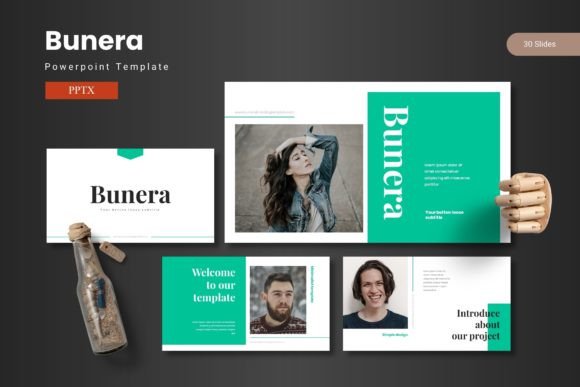
Bunera: A Premium PowerPoint Template for Modern Presenters
Creating a presentation that truly stands out is often a battle against time, design skills, and the limitations of generic templates. You need slides that are not only informative but visually compelling, capable of turning data into a story and ideas into conviction. This is precisely where the Bunera PowerPoint Template enters the picture. It is not just another set of slides; it’s a complete design system built to help professionals, educators, and creators communicate with clarity and impact.
What Makes Bunera Different?
At its core, Bunera is a meticulously crafted PowerPoint template designed for those who refuse to settle for mediocre visuals. Its foundational principle is simple: empower the user with a powerful, flexible framework so they can focus entirely on their message. Instead of starting from a blank canvas and wrestling with alignment, color choices, and graphic design, you begin with a library of professional, ready-to-use slides. The Bunera PowerPoint Template provides 150 total slides, intelligently distributed across five distinct premade color schemes. This means you get 30 unique slides for each color variation, offering immense variety right from the start.
A Foundation Built on Master Slides and Precision
The quality of any template lies in its underlying structure. Bunera is built on a system of master slides, ensuring consistency across your entire presentation. Changing a font or a logo placeholder on a master slide updates it throughout, saving you hours of manual editing. Furthermore, the template boasts pixel-perfect illustrations and handcrafted infographics. These aren’t generic clipart; they are custom-designed visual elements meant to represent data, processes, and concepts in a clean, modern style. Every graphic is fully resizable and editable within PowerPoint, giving you the freedom to adapt them perfectly to your content without losing quality.
Key Features That Streamline Your Workflow
Let’s break down the specific features that transform Bunera from a template into a practical tool. First, the inclusion of section break slides helps you organize your presentation into clear chapters, improving narrative flow for your audience. The five color variations are not minor tweaks; each offers a complete, cohesive palette affecting backgrounds, charts, text colors, and graphics, allowing you to match your company branding or the tone of your topic instantly.
For content insertion, Bunera simplifies the process with dedicated picture placeholder slides. You can drag and drop your images directly into these frames, and they will automatically resize and fit within the designed layout. This is a huge time-saver compared to manual cropping and positioning. Specific slides for galleries and portfolios are also included, making it ideal for showcasing products, team members, project case studies, or creative work.
- Total Volume & Organization: 150 slides, 30 per color, with structured section breaks.
- Design Flexibility: 5 premade color schemes, all graphics editable and resizable.
- Content-Ready Slides: Handcrafted infographics, picture placeholders, gallery/portfolio layouts.
- Complete Package: Main file includes 5 PPTX files (one for each color), a total of 30 slides from PowerPoint per theme, and clear documentation.
Real-World Applications: Where Bunera Shines
The utility of the Bunera PowerPoint Template extends far beyond a single type of user. Its design is versatile enough to serve a wide spectrum of needs.
For Business Professionals & Entrepreneurs: Imagine pitching to investors, presenting quarterly results to your team, or launching a new internal initiative. Bunera’s data-driven infographics and professional aesthetic lend authority to your numbers. The customizable layouts let you maintain corporate branding while creating a fresh, engaging experience each time.
For Marketers & Content Creators: Marketing presentations often need to be fast, visually stunning, and adaptable. Whether you’re presenting a social media strategy, a content calendar, or a client report, Bunera’s gallery slides and easy-to-edit graphics allow you to showcase visuals and key metrics powerfully. The template helps you tell a persuasive story.
For Educators & Trainers: Educational material needs to be clear, structured, and engaging to hold attention. The section breaks in Bunera help segment lectures or training modules. The clean illustrations can diagram complex concepts, and the variety of layouts prevents slide fatigue for your students or trainees.
For Freelancers & Hobbyists: Even if you’re presenting a personal project, a community initiative, or your creative portfolio, using a polished template like Bunera elevates your work. It signals professionalism and care, helping your ideas be received with greater seriousness and interest.
The Tangible Benefits: Efficiency, Consistency, and Impact
Choosing Bunera translates into several concrete benefits. The most immediate is a dramatic increase in efficiency. You bypass the most time-consuming parts of presentation design. Consistency is automatically enforced by the master slide system, ensuring your fonts, colors, and logo placement are uniform throughout, which strengthens your branding. Finally, the impact on your audience is profound. Visually stunning slides that combine data, graphics, and text in a balanced way enhance comprehension, retention, and engagement. You share your ideas with confidence because the medium supporting them is robust and attractive.
Practical Considerations When Using Bunera
To get the best results from the Bunera PowerPoint Template, approach it with a clear plan. Start by selecting the color scheme that best aligns with your brand or the emotional tone of your presentation. Don’t try to use all 150 slides; browse the library and select the layouts that naturally fit your content flow—the title slides, comparison slides, quote slides, data slides, and conclusion slides.
Remember that while the graphics are editable, they are already well-designed. Often, minor adjustments suffice. Use the picture placeholders as intended: drag and drop your high-quality images. The template includes font and photo information in the documentation, so adhere to those recommendations for optimal visual harmony. The key is to let the template do the heavy lifting of design while you focus on injecting your unique content and narrative.
In a digital landscape where attention is scarce and first impressions are formed swiftly, your presentation tools matter. The Bunera PowerPoint Template is more than a collection of slides; it’s a strategic asset for clear communication. It empowers you to move swiftly from idea to execution, delivering your message on a stage of professional design. Whether your goal is to inform, persuade, teach, or inspire, having a foundation of 150 meticulously designed slides at your fingertips changes the game. It allows you to concentrate on what matters most: the power of your ideas.